Showing posts with label design. Show all posts

Saturday, November 19, 2011

Layout Tip: Spacer in LinearLayout

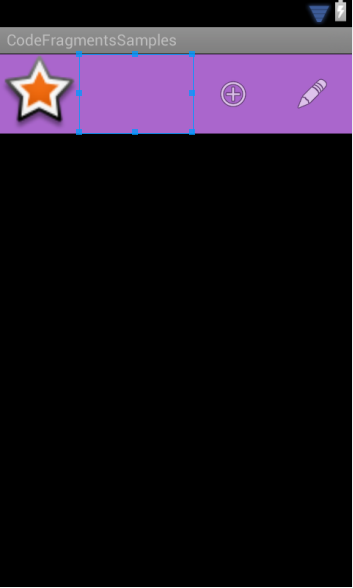
Sometimes you want a layout where you want a spacer view that fills that pushes views to the right of it as far as they can. A common need to do something like this is when you roll your own Action Bar.
The action bar layout with the spacer view highlighted.
XML Layout


Explanation
When working with LinearLayout there's an option to use weights of free space rather than a set amount of space. When the layout measures its children it first sets the fixed sized children. For this layout that's everyone except the spacer view. Then it does another pass to measure the children that will fill dimensions based on their android:layout_weight parameter. Since there's only 1 view with this parameter, it fills up the remaining space.

Source Code
actionbar.xml | Project Page

Thursday, November 3, 2011

Android Design Templates

Today I was throwing around some app ideas and I always like to draw these ideas out to visualize them. I remembered seeing some templates in the past that you could print out and have the outline of a phone to draw your app in, so I went searching for some Nexus S and Galaxy Tab templates. I didn't really find any, but I did find several other android idea/sketching goodies. In the end, however, I decided to make a custom template with my devices and I am releasing them under a creative commons license for all of you out there to enjoy. If you have suggestions on how to make it better, let me know in the comments.


Tuesday, October 25, 2011

Tip: Choosing a Color Palette/Theme

Many Android apps out there don't look that well. While it's not impossible to make a great looking app. It's difficult if you're a lone developer with little designer skills. 


A big reason why developers (without design sense) make poor looking apps is because it's difficult to get a consistent color theme. In short, developers suck at picking colors. This shouldn't discourage you though. A great way to overcome this problem is to have other people that are good at picking colors do it for you, for free.


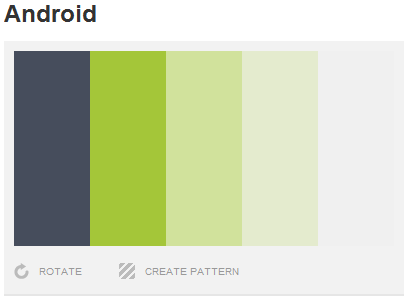
There's a site called Colour Lovers which has been indispensable as a tool for finding a good color themes. Try to stick with a clean palette of 3-5 colors (+ black and white) and use only those colors throughout the application.


Of course you'll want to tag these colors as color resources in your app.

http://www.colourlovers.com/


Android Color Palette (http://www.colourlovers.com/palette/1392493/Android)


res/colors_palette.xml

    #ff464D5C
    #ffA4C639
    #ffD1E29C
    #ffE4EBCE
    #ffF0F0F0


Of course when referencing color resources in xml use the @color/name syntax.

Monday, October 24, 2011

Android Asset Studio

A lot of Android developers don't have designers working with them to make their apps look as great as they're built. Following the Android User Interface Guidelines is important to make an app feel like it fits in naturally with the rest of the OS. A great tool to help with this is the Android Asset Studio.


Asset Studio takes basic vector shapes, clip art, and so on and makes icon resources that follow the guidelines. It works pretty well and is being actively developed by Google engineers.


It supports Launcher, Menu, Action Bar, Tab and Notification icons as well as placing screenshots into phone frames.


Asset Studio - Launcher Icon Generator
UPDATE: Some of these features made their way into the Android Eclipse plugin. The web app still have more features in it though. You can access it by right clicking your project in the Package Explorer view's and selecting New -> Other. Then drill down to Android Icon Set.