Showing posts with label resources. Show all posts

Saturday, November 19, 2011

Layout Tip: Spacer in LinearLayout

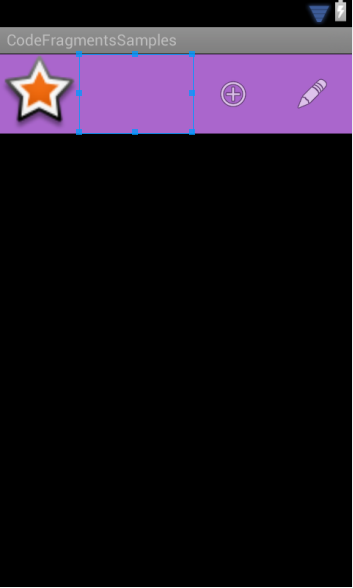
Sometimes you want a layout where you want a spacer view that fills that pushes views to the right of it as far as they can. A common need to do something like this is when you roll your own Action Bar.
The action bar layout with the spacer view highlighted.
XML Layout


Explanation
When working with LinearLayout there's an option to use weights of free space rather than a set amount of space. When the layout measures its children it first sets the fixed sized children. For this layout that's everyone except the spacer view. Then it does another pass to measure the children that will fill dimensions based on their android:layout_weight parameter. Since there's only 1 view with this parameter, it fills up the remaining space.

Source Code
actionbar.xml | Project Page

Tuesday, November 1, 2011

Tip: Naming Resource Files

Android has a lot of resource files. These normally are XML files that have the <resource> root tag. The standard convention is to split resources out by type. The problem with this is these files tend to get very large and become unweildly to edit. A better way to organize them is by adding a category to the file name as well.

For example: strings_preferences.xml would contain all the strings that pertain to preferences while strings_application.xml will pertain to application strings that you might not want to localize.

Layouts sometimes become difficult to determine where they lie in the hierarchy. A good convention is to name layouts that are bound to an activity with the prefix activity_[activity name]. So MainActivity > activity_main.xml. Do this with fragments too: BuddyListFragment > fragment_buddylist.xml.

Monday, October 24, 2011

Android Asset Studio

A lot of Android developers don't have designers working with them to make their apps look as great as they're built. Following the Android User Interface Guidelines is important to make an app feel like it fits in naturally with the rest of the OS. A great tool to help with this is the Android Asset Studio.


Asset Studio takes basic vector shapes, clip art, and so on and makes icon resources that follow the guidelines. It works pretty well and is being actively developed by Google engineers.


It supports Launcher, Menu, Action Bar, Tab and Notification icons as well as placing screenshots into phone frames.


Asset Studio - Launcher Icon Generator
UPDATE: Some of these features made their way into the Android Eclipse plugin. The web app still have more features in it though. You can access it by right clicking your project in the Package Explorer view's and selecting New -> Other. Then drill down to Android Icon Set.